Followthrough: building outcome-aware apps that check their own work
Most apps can tell you how many people clicked a hint. Very few can tell you whether the person got where they were going. This is about apps that can.
Ana and the schedule screen
Ana runs a builder with twenty people. She signed up for a project app, created her first project, "Las Palmas building", and then stopped. She has opened the schedule screen three times. Each time she looked at the empty list and left.
A typical hint tool would show her a tooltip: "Tip: you can import activities from a file." If she clicks it, the dashboard counts a click and marks the hint as a success. Nobody checks whether a single activity ever reached her project.
That gap bothers me. The usual fixes for people who get stuck halfway (tooltips, checklists, product tours, "did you know" banners) stop at showing the hint. They measure attention to the hint, not the outcome the person came for: an account set up, a first listing published, a team invited, a delivery finished.
Outcome-aware apps
An outcome-aware app closes that loop. It does three things.
It knows the goal and the distance to it. The app declares what people typically come to do, such as "set up the first project", as a few weighted steps. For each person it knows how close they are: their proximity, from 0 to 100%. It also notices friction: repeated failed saves, validation errors on the same field, going back and forth between two screens.
It offers one next step. One suggestion at a time, never a tour. Each one carries a short reason the person can open ("Why am I seeing this?"), and a Yes and a Not now. The step is either done by the person through the interface, or handed to an AI agent, but only after the person says yes, and only with what that person could already see.
It verifies that it really happened. On the person's next visit, the app checks the real data. The goal counts as met only if it is. If an agent reports "done", that report is stored separately and is never trusted on its own.
What I call Followthrough is that loop: suggest, act (person or agent), verify. Plus a report that compares people who got a suggestion with a baseline of people who got none.
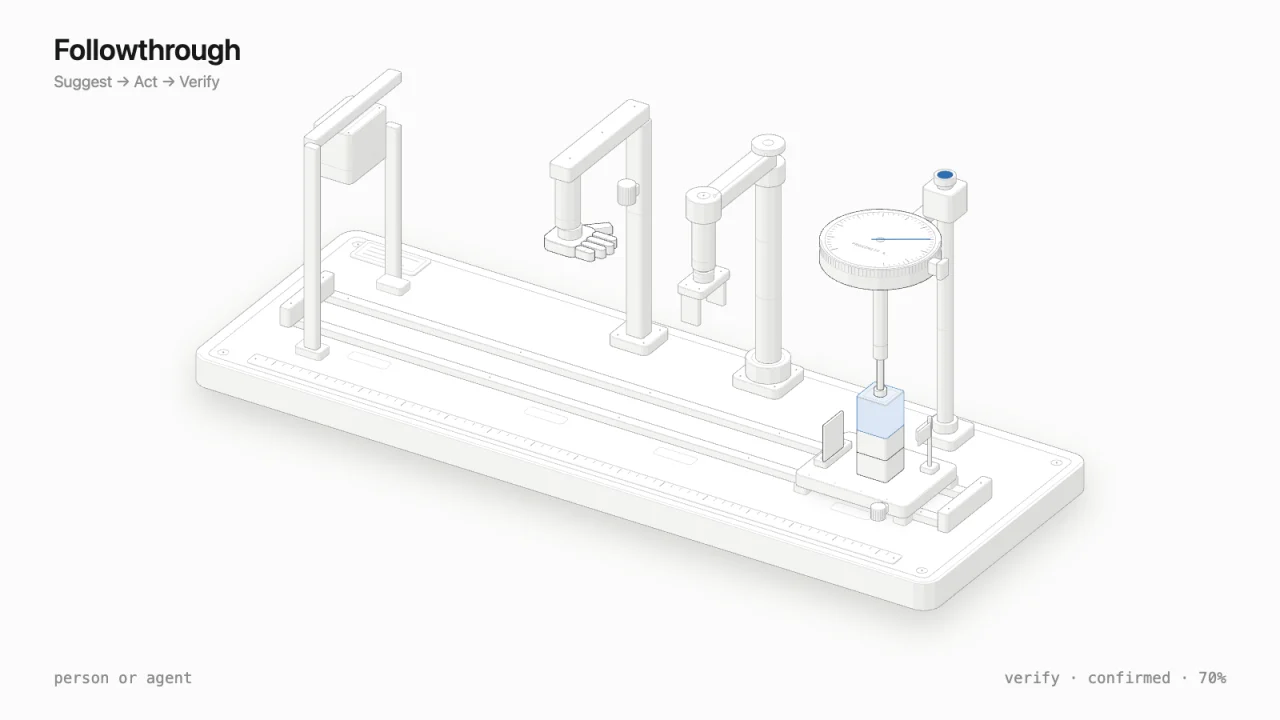
The machine is interactive: click it to switch who acts, the person or the agent.
The figure as a machine. The needle on the proximity gauge only moves after the plunger at Verify measures the stack. The flag at Act says "reported"; it doesn't move the needle.
I want to be honest about what is new here. Funnels and activation analytics are not new. Neither are in-app hints, A/B tests, "next best action" in marketing, or AI agents that do tasks. What I haven't seen often is all of them in one loop inside the app itself: one suggestion, an optional agent bounded by the person's own access, verification against real data instead of clicks or the agent's word, and privacy built into the mechanism rather than added later.
Four cases
These four are invented. The names, numbers and screens are made up to show the shape of the loop; none of them is a customer or a real result. For each one: where the person is stuck, the one suggestion, who acts, and how the app verifies.
Case A: a builder sets up a project
Ana created "Las Palmas building" but no schedule. She has done 2 of 5 weighted setup steps, so her proximity is 40%. She opened the schedule screen three times and left.
The suggestion: Import your activity list from your spreadsheet. Why: without a schedule, the app can't forecast your handover date.
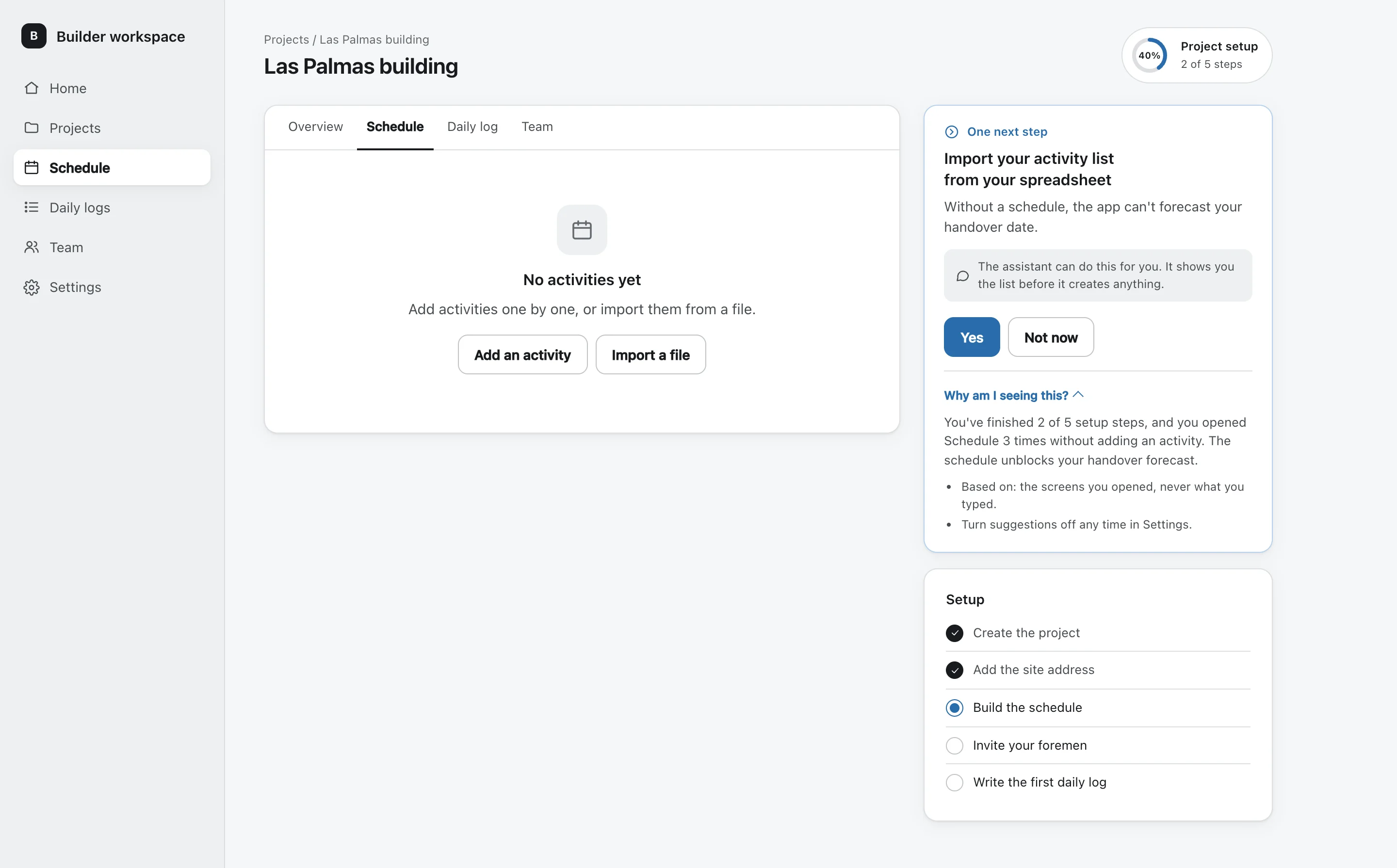
Here the agent acts. Ana taps Yes and uploads her sheet. Before anything is written, a confirmation screen lists what the assistant will create: 48 activities, with the first five shown. She confirms, and the assistant creates them.
The whole loop on Case A, from the hesitation to the check on the next visit.
On her next visit, the app counts the activities on the project. It finds 48, and her proximity moves to 70%. The setup goal still isn't met: it counts as met only when her first daily log is in too.
Case B: a landlord lists a flat
Kofi is listing one 2-bedroom flat. His photos are uploaded, but he stopped at the price field twice, both times on the same error: price empty. Proximity: 60%.
The suggestion: Add the monthly rent. Similar 2-bedroom flats nearby list between 45,000 and 60,000.
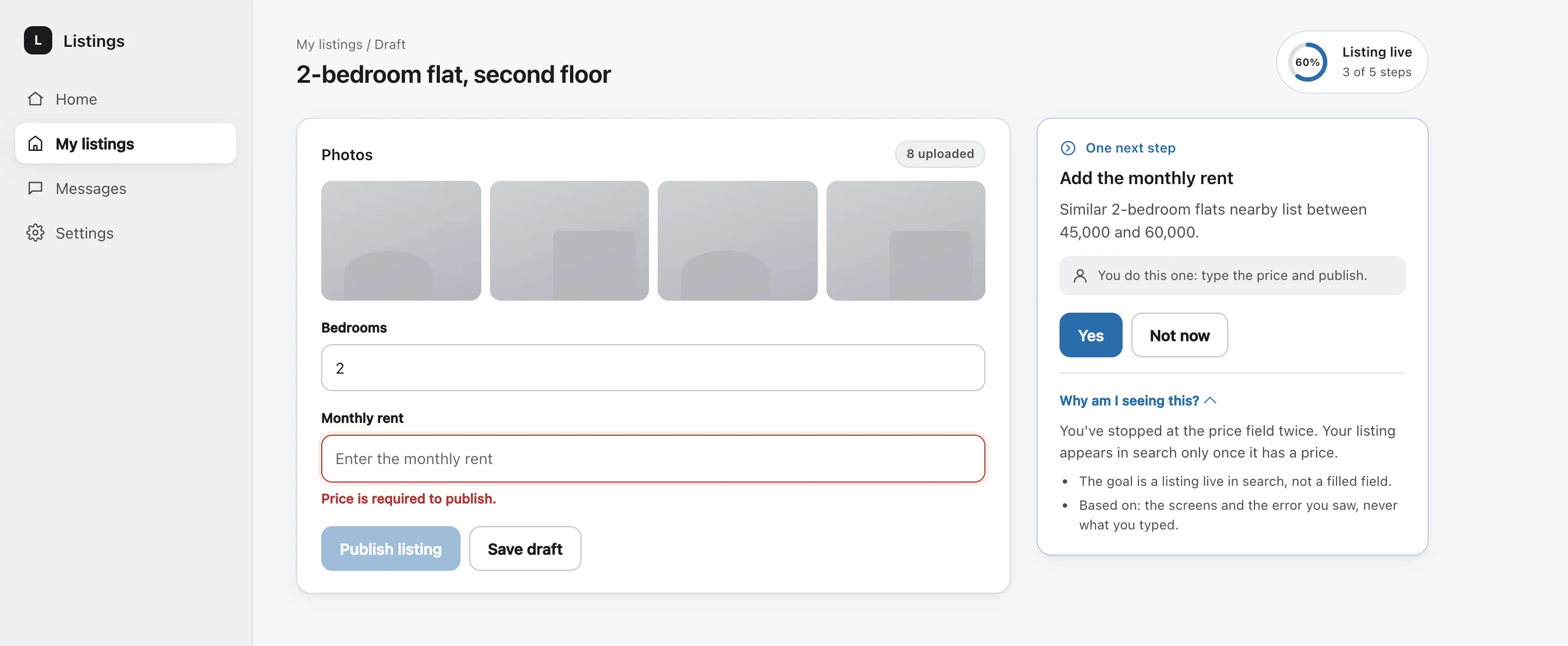
Kofi acts himself: he types the price. The app verifies that the listing is published and visible in search. "Filled the field" is not the outcome. "Listing live" is.
Case C: a neighbour who reads but never posts
Marta joined a neighbourhood app two weeks ago. She reads every day and has never posted. The app doesn't show her a feed of every group. It suggests one group that matches what she reads: "Gardening on Calle 9".
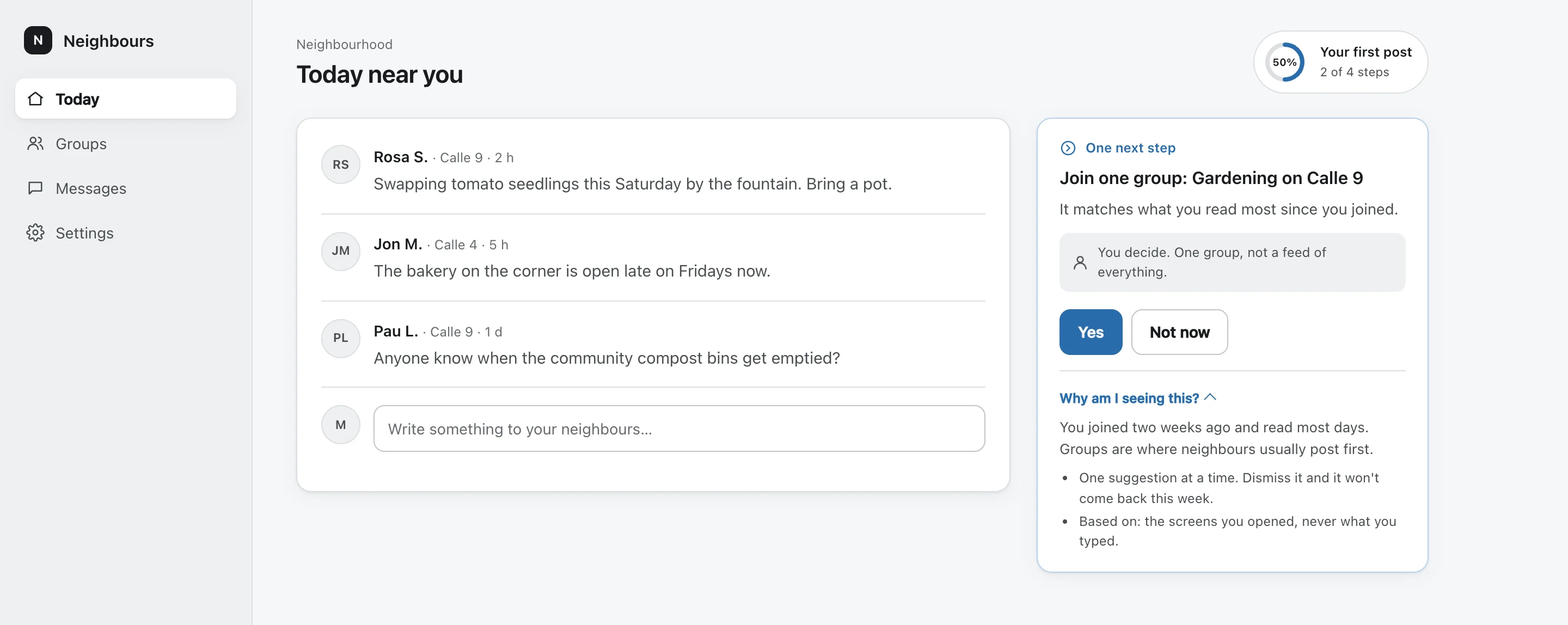
Marta decides. The app checks one thing: did she post within seven days? And this is where the report comes in. It compares her group, members who got a suggestion, with similar members who got none: the baseline. Without a baseline you can't tell whether the suggestion helped or whether those members would have posted anyway. And the report only shows groups of 10 people or more, so nobody can be picked out of it.
Case D: a client who never picks favourites
Leo, a photographer, shared a gallery with a client. The client opened it but never picked favourites, and the deadline is in three days.
The suggestion is one reminder with the deadline and a "Pick 20 favourites" button. Not three emails.
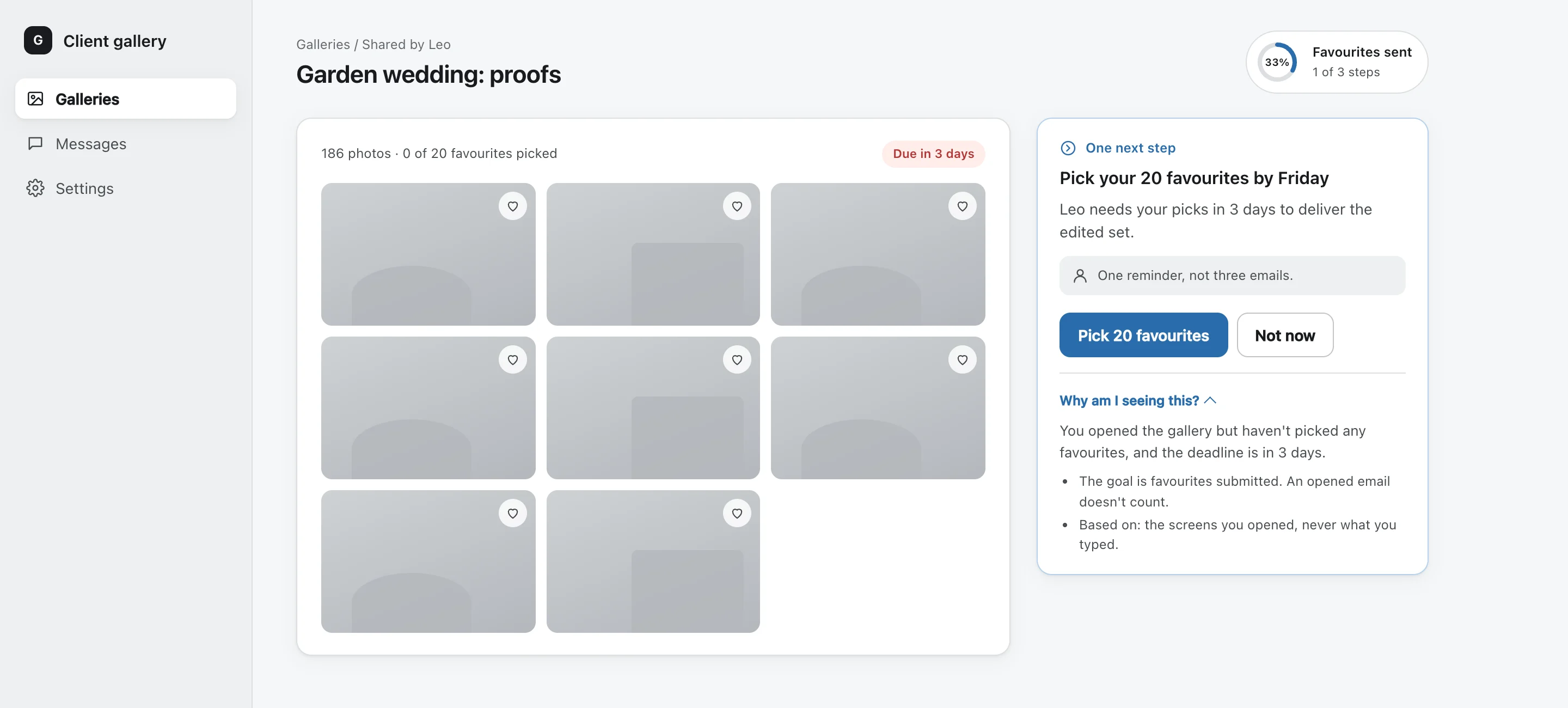
The client acts. The app verifies that the favourites were submitted. "Email opened" does not count.
Reported is not confirmed
If you remember one thing from this article, make it this one. There are two kinds of "done", and they go in two different columns.

Reported is what someone says happened. The agent said "done". The person clicked the hint. Both are worth storing, and neither is trusted on its own.
Confirmed is what the data shows. The 48 activities exist on the project. The listing is live in search. The favourites were submitted. The app checks this on the next visit, against the real records, and only this counts as the goal met.
This matters more with agents, not less. An agent that says "I created the activities" can be wrong: a file with a broken column, a write that half failed, a timeout it didn't notice. A hint tool that counts clicks makes the same mistake from the other side: it records attention and calls it progress. Keeping the two columns apart is cheap, and it means the number you look at is the number that happened.
Person or agent
The step is done by the person or by an agent, and the person always chooses. When an agent acts, two rules hold.
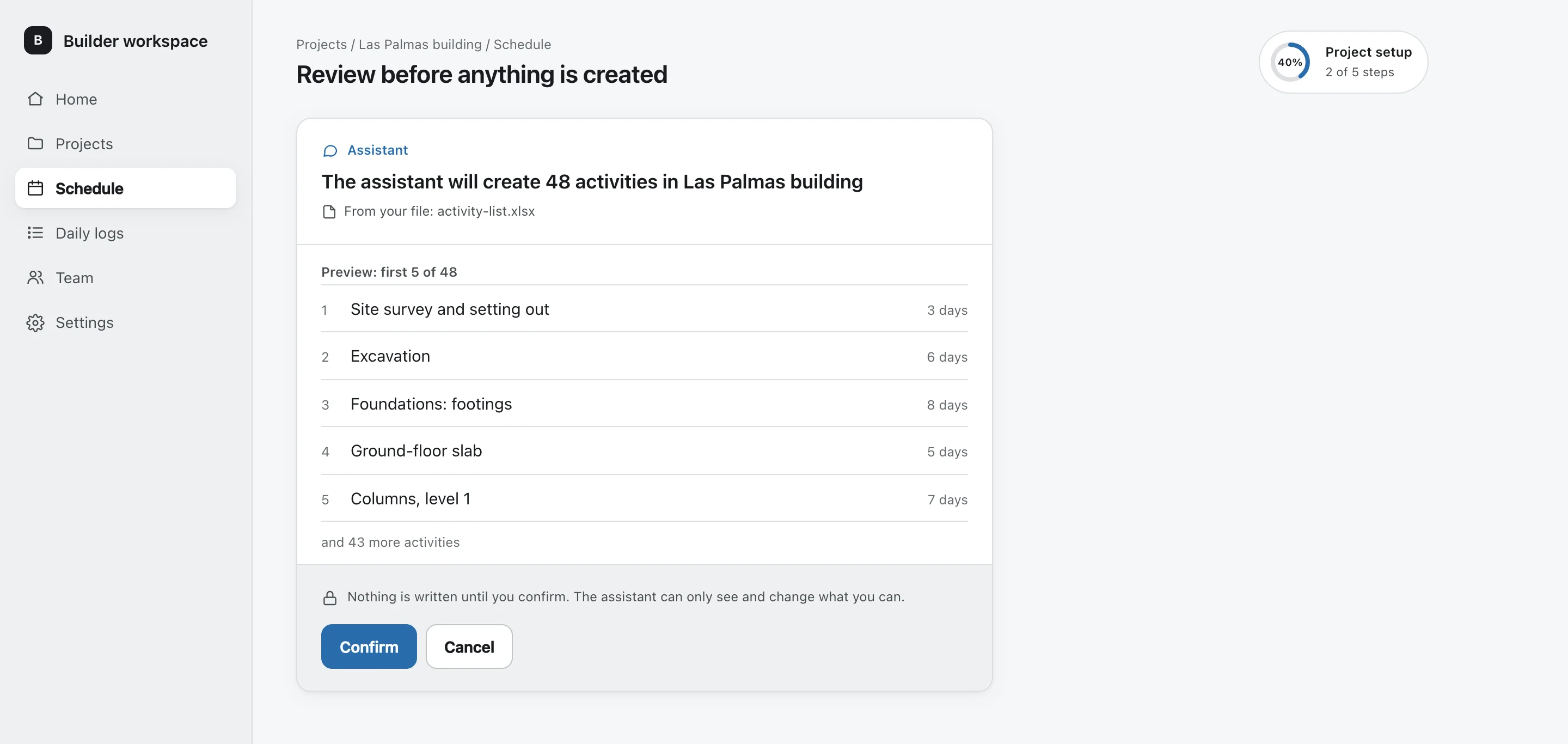
First, the agent never writes without you. Before it creates anything, it shows what it will create, and nothing is written until the person taps Confirm.
Second, the agent only gets the person's own access. It reads only what that person could already read and changes only what they could change. It is not a back door with admin rights. If Ana couldn't see another company's projects, neither can the assistant working for her.
Privacy by design
Watching where people get stuck is close to watching people, so the privacy rules are part of the mechanism, not a policy page. Six of them:
- Names, not content. Only the names of screens, fields and error codes are recorded, never what people type. The app knows Kofi hit "price empty" twice. It knows nothing he typed.
- One switch. One setting turns it off for a person, and it is honoured everywhere, immediately.
- Forgetting is built in. Closing an account deletes everything the app learned about that person. Older records are replaced with a one-way pseudonym after a few days and deleted after a year.
- The agent stays inside your access. It reads only what the person could already read, and writes nothing without their confirmation.
- Groups of 10 or more. Reports only show groups of at least 10 people. Smaller groups are hidden, so nobody can be singled out.
- No tells. Blocking and opt-outs are never revealed. The app never refuses or notifies in a way that would tell someone they were blocked.
What I don't know yet
I don't know yet whether this works better than a good checklist. The gain has not been measured. The first comparison against a baseline is about to run: people who get suggestions on one side, similar people who get none on the other, and the share of each group that reaches its goal, confirmed, not reported.
I'll publish that number whatever it turns out to be. If it is small, or zero, that is worth knowing too.
Where do your users get stuck?
Hints that count clicks are easy to build and easy to report on. Checking the outcome is harder, and I think it's the part that matters.
If you build apps, I'd like to hear where your users get stuck halfway, and how you know whether they ever got through. Tell me, and tell me what "done" means in your app.